
HDR Images restore overexposed and underexposed areas and generally increase image quality.
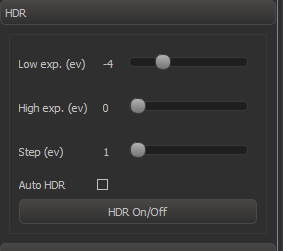
HDR enable/disable
How to toggle HDR/normal mode:
...
HDR image will be replaced by normal image when position of object is changed.
Auto HDR mode
In auto HDR mode, HDR image generation is automatically enabled after a short period of inactivity. YOu can enable in the checking "Auto HDR" control in HDR panel.
HDR Settings
| Setting | Comment |
|---|---|
| Low exp (ev) | Lowest HDR exposure relative to the current exposure. The less the value, the more intensive highlights can be correctly rendered in the HDR image |
| High exp (ev) | Highest exposure relative to the current exposure. The higher the value, the more deep shadows can be correctly renderered in the HDR image. |
| Step (ev) | HDR algorithm step. Larger step means faster generation, but worse quality. |
| Auto HDR | Enable/disable Auto HDR (see above) |