
HDR Images restore overexposed and underexposed areas and generally increase image quality.
HDR enable/disable
How to toggle HDR/normal mode:
- Press "Spacebar" on the keyboard
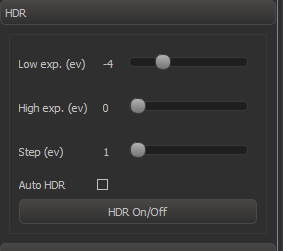
- Press "HDR on/off" in the HDR panel (see below)
- Press "5" joystick button (3D Connexion Joystick).
HDR image will be replaced by normal image when position of object is changed.
Auto HDR mode
In auto HDR mode, HDR image generation is automatically enabled after a short period of inactivity. YOu can enable in the checking "Auto HDR" control in HDR panel.
HDR Settings
| Setting | Comment |
|---|---|
| Low exp (ev) | Lowest HDR exposure relative to the current exposure. The less the value, the more intensive highlights can be correctly rendered in the HDR image |
| High exp (ev) | Highest exposure relative to the current exposure. The higher the value, the more deep shadows can be correctly renderered in the HDR image. |
| Step (ev) | HDR algorithm step. Larger step means faster generation, but worse quality. |
| Auto HDR | Enable/disable Auto HDR (see above) |