
Current Workflow Overview for Transferring Sawing Planes for Carbon Projects to a Specific 4P Cutter
This page outlines the general workflow for transferring sawing planes for Carbon projects to a specific 4P cutter. The process involves using an additional Vibox Reco4P scanner and the Cutwise service (which serves as a cloud platform for storing projects, setups, their interconnections, and performing calculations on its servers).
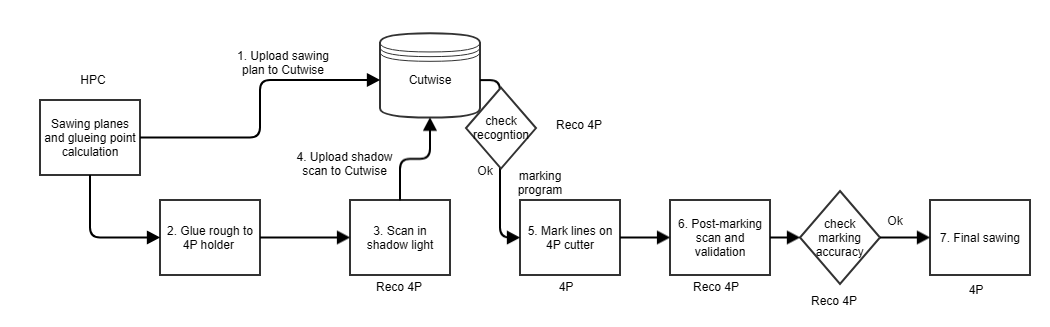
Workflow Steps:
HPC Software Calculation
The operator calculates the sawing plan for the selected solution using HPC software.
HPC suggests a rough glueing point during the sawing calculation.
The operator then uploads the resulting project to Cutwise.
Material Attachment to the 4P Holder
The rough is glued to the 4P holder, preferably following the HPC plan.
Scanning in Vibox Reco4P (see Scanning object for 3D model registration)
The stone (now attached to the holder) is placed in the Vibox Reco4P scanner.
The corresponding project and solution are located in Cutwise.
The stone is scanned in shadow lighting.
Cutwise Processing
The scan results are uploaded to Cutwise, where:
The 3D model is registered in the Vibox Reco4P system.
Programs for marking lines (on the stone surface) and final sawing (on the 4P cutter) are calculated.
Marking Line Application (Verification Step)
Before applying the marking lines, the operator checks the registration (recognition) report to ensure accuracy.
If registration is correct, the marking lines are applied on the 4P cutter.
This step verifies that the coordinate transformation between Vibox Reco4P and the 4P cutter is accurate.
Post-Marking Scan & Validation (see Testing accuracy of laser marking)
The object is placed back into the Vibox Reco4P and scanned under another lighting to inspect the markings.
The operator marks the applied planes on the photos.
The software compares the planned planes with the actual ones (marked by the operator) and calculates linear and angular errors.
Final Sawing
If the error margin is within tolerance, the planes are cut using the previously generated program.